Counter, tables ya online orders. Ek flat price, sab included.
Bill in a few taps, print the bill and KOT with one tap, take QR and online orders with UPI, and run the kitchen from a screen or a printer. Owner view, WhatsApp bills, your own delivery and setup help come free in the plan. No add-ons to buy later.
Sign up in a minute. No payment details needed for the trial.
- Phone, tablet or laptop
- One-tap Bluetooth print
- QR + online orders, UPI
- Billing works offline
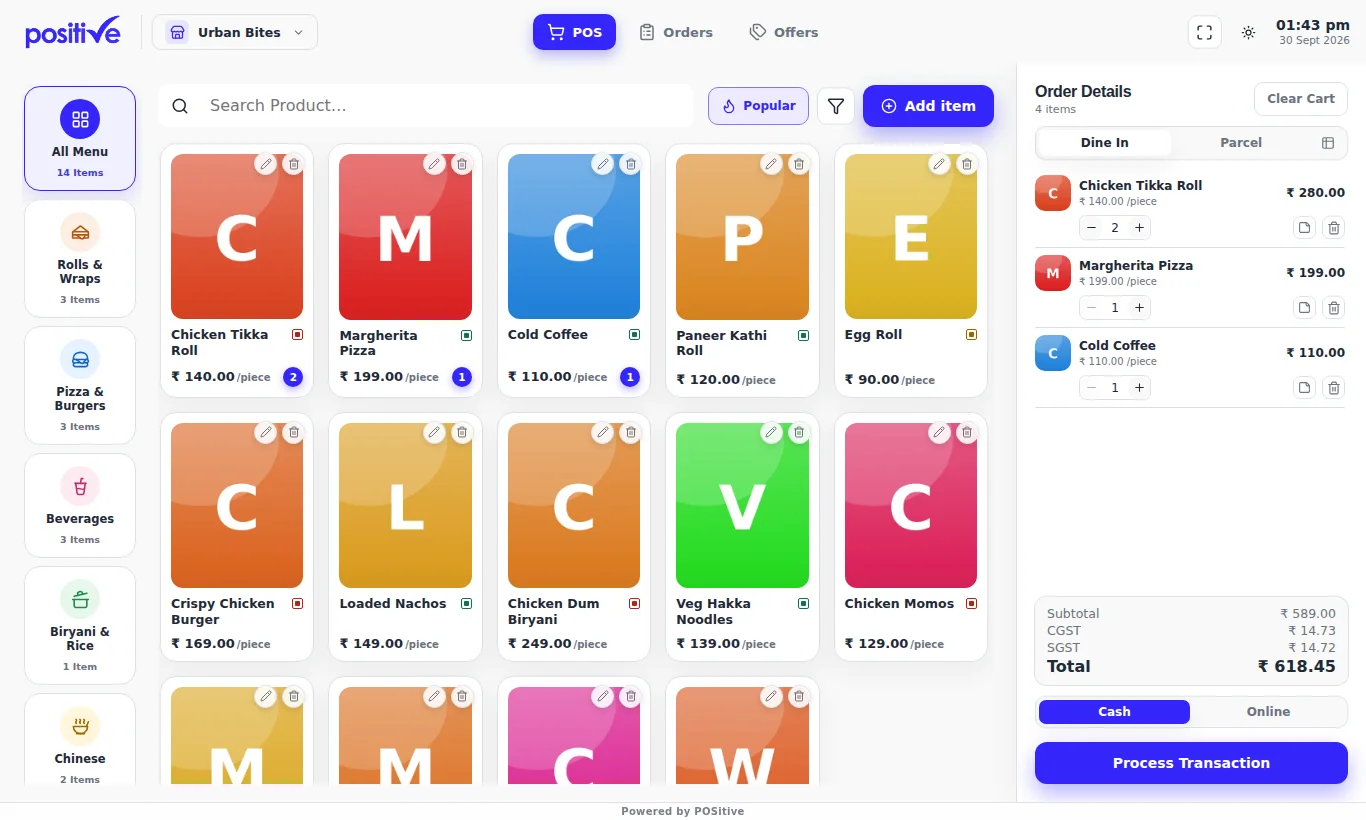
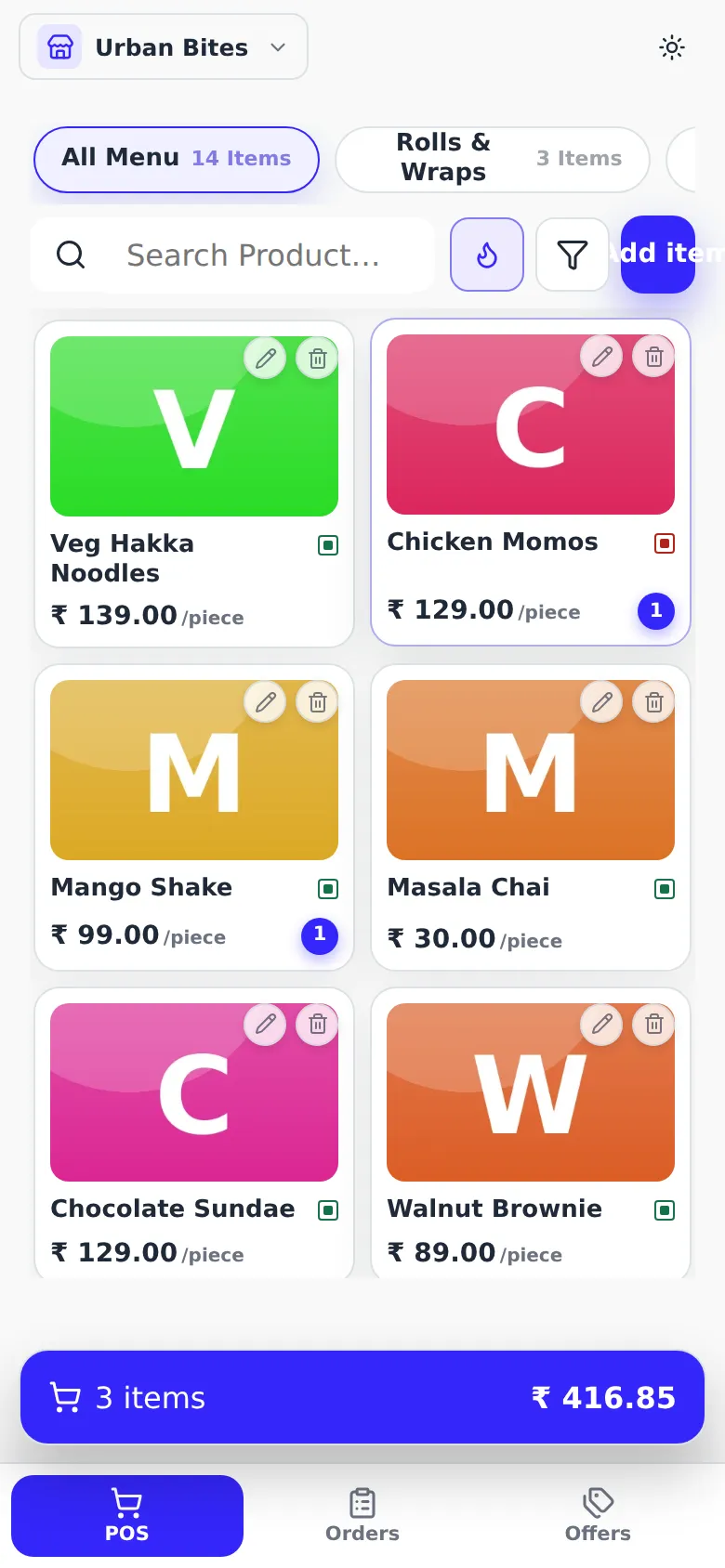
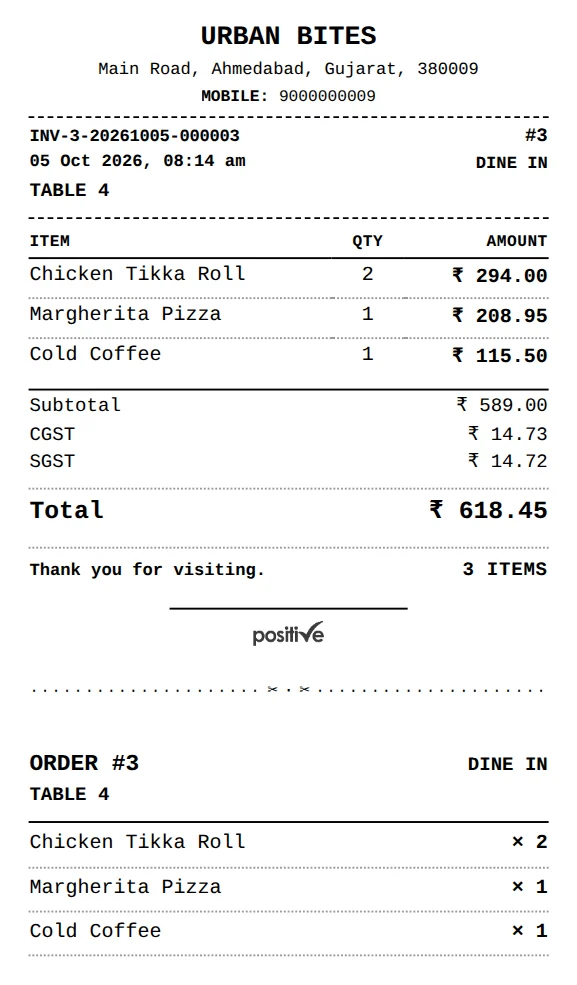
QSR ho, full restaurant ho, ya sirf online orders
Customers who pay first at the counter, tables with waiters who pay after eating, or a kitchen with no counter that takes every order from its own link. One kitchen or many.
Three ways to take orders, one system
The kitchen works from a screen on any phone or tablet, or from printed slips if you have a printer. Both plans include both.
- 1Counter and Restaurant
At the counter
Tap the items, take cash, UPI or both, and the order goes to the kitchen. Print a bill if the customer wants one, or skip the paper.
- 2Counter and Restaurant
By QR, from the customer's phone
One QR on every table and at the counter. Customers order and pay by UPI first, or at the counter if you choose. You check the payment and approve with one tap, and the kitchen gets it.
- 3Restaurant
At the table, by a waiter
Waiters take orders on their phones and send each round to the kitchen. The bill stays with the table and is paid after eating.
Want paper? Customer bill and kitchen slip print on one strip
Everything in the plan, nothing sold separately
Many billing apps start cheap and charge again for each extra tool. Here is what comes with POSitive, next to what you often find elsewhere.
| What you need | POSitive | Typical billing software |
|---|---|---|
| QR ordering with UPI | Included | Often a paid extra |
| Kitchen screen and token board | Included, on any phone or tablet | Often a paid extra |
| Billing without a printer | Yes, from a phone | Usually built around a printer |
| Billing when the internet drops | Included | Not always |
| Owner view for many outlets | Free from 2 outlets | Often charged per outlet |
| Inventory with recipes and food cost | Included in Restaurant | Often a paid extra |
| More phones, tablets and printers | No extra charge | Often charged per device |
| Own delivery boys with a rider screen | Included | Often a separate tool |
| WhatsApp bill and offers (free way) | Included | Often paid message credits |
| How the price works | One price per outlet | A base price plus add-ons |
"Typical" is what we found on the official price pages of popular Indian billing apps (checked 1 November 2026). Paid gateways and WhatsApp Business API messages are charged by those providers, not by us.
Doosre isse alag se bechte hain. Hum free dete hain.
One flat price per outlet. These come with it, at no extra charge from us.
- Owner view for all your outlets
Paid extraFREE - QR ordering and online order link
Paid extraFREE - Kitchen screen, for every kitchen
Paid extraFREE - WhatsApp bill and offers
Paid extraFREE - Your own delivery boys, rider screen
Paid extraFREE - More staff logins, phones and printers
Paid extraFREE - Setup help on your menu
Paid extraFREE
WhatsApp Business API messages (only if you connect your own API number) are charged by Meta, and a paid payment gateway charges its own fee. UPI to your own UPI ID has no fee.
Answer four questions, see your plan
Works with whatever you have: any phone, tablet or laptop, a printer or none.
Counter (QSR)
- Bill at the counter on a phone, tablet or laptop. Customers pay first; one tap per job: Bill, KOT, Bill + KOT or WhatsApp.
- One thermal printer (58 or 80 mm, Bluetooth, USB or RawBT) prints the bill and the KOT.
Built for everyone who sells food
A one-person stall, a busy café or a restaurant with tables and waiters. The same software grows with you from one outlet to many.
Billing on your phone
The whole counter works on a phone, a tablet or a laptop. Use one device or many, at no extra cost.
Keeps working offline
No internet? Bills, open tables and payments are kept on the device and upload by themselves later. A phone hotspot is enough to stay fully online.
Kitchen screen on any phone
A clear New, Preparing and Ready queue with waiting times, and a token board on a TV for customers. Prefer paper? Print kitchen slips instead.
QR ordering with UPI
One QR for the whole shop. Customers scan or save your UPI QR, pay from any UPI app and type the payment reference; the counter approves with one tap. Money goes straight to your bank, no fee from us. A reused reference is flagged.
GST when you need it
Add your GSTIN and FSSAI and they print on every bill, with CGST and SGST split. No GSTIN? Leave it off.
Offers that apply themselves
Percentage, flat, buy-X-get-Y and combo deals are applied and shown before you charge.
Tables and waiters (Restaurant)
See every table with its running total. Waiters order from their phones with their own PIN, rounds go to the kitchen, and the bill is paid after eating.
Full inventory (Restaurant)
Chicken, paneer, oil. Each bill takes its recipe out of stock, dishes go sold out by themselves, and you see missing stock and food cost.
Every outlet, one owner login
With 2 or more outlets the owner view is free. See all outlets live, and manage their menus and offers from one place.
Reports for any dates
Sales by day, item and payment, cash vs UPI, most-ordered dish, with Excel. Older bills are kept as monthly Excel files and stay in your totals.
Split payment
Part cash, part UPI on one bill. And it adds up correctly in your cash and online totals.
Your own delivery boys
Assign an order in one tap. The rider sees it on his phone with the address and a map link, marks it delivered and the cash he collected. The customer can follow it.
Offers on WhatsApp, the right way
Only to customers who said yes, sent from your own WhatsApp one by one (free), with a STOP line. No bulk tricks that get a number banned.
Kitchen far from the counter
A phone or tablet in the kitchen shows the orders and prints each KOT on the printer next to it, by itself. Several printers, each with its own job.
Discounts with a reason
Give a regular ₹20 or 10% off. The reason prints on the bill and shows in reports, and GST is charged on what they pay.
Payments go straight to your bank
No gateway needed to start. Nothing is held by us.
- 1
Customer pays you directly
On the QR page the customer scans or saves your UPI QR and pays from any UPI app. The money goes straight to your bank. POSitive never touches it.
- 2
They type the reference
The customer types the 12-digit UPI reference. The counter checks its UPI app or soundbox and taps Approve; the KOT goes to the kitchen. A reused reference is flagged.
- 3
Or pay at the counter
Cash or UPI at the counter, as today. Want it fully automatic? Connect your own Razorpay or Cashfree (their fee, ₹0 from us): the order goes in as soon as the payment is confirmed.
Rush ke time bhi bharosa
- 1,250+automatic checks pass before every release
- 2browser engines tested on every flow: Chrome and Safari (iPhone)
- 3screen sizes checked: phone, tablet, laptop
- Offlinebills are kept on the device and upload once when the internet is back
See POSitive in 3 minutes
Watch it in Hindi, English or Gujarati. Every part has its own short chapter, with captions. Then build your setup below and open its demo.
One price per outlet. Owner view free.
Three ready plans, or build your own from the modules you need. No fee on your bills, nothing extra for more phones, tablets or printers.
Online orders
For home kitchens, tiffin services, cloud kitchens, caterers and train food. No billing counter needed.
Loading the price…
- Your own order link to share on WhatsApp and Instagram, or as a QR
- Customers order with their home address, or their train seat
- They pay you by UPI, or cash on delivery
- Every new order rings and opens full screen on your phone
- Tap or swipe each order to Ready, then Sent
- Bills on WhatsApp or printed, with sales and GST reports
Counter (QSR)
For stalls, chai and juice counters, food trucks, cafés, quick-service shops, bakeries and sweet counters. Customers pay first.
Loading the price…
- Fast billing on a phone, tablet or laptop, with GST, offers and discounts applied for you
- QR ordering, where customers order and pay by UPI from their own phone
- Kitchen screen on any phone or tablet, with a token board for a TV
- Or printed bills and kitchen slips, on any 58mm or 80mm printer
- Cash, UPI or both on one bill
- One-tap Sold out on any item
- Keeps billing offline and uploads later
- Reports for any dates, with Excel
Restaurant (tables)
For restaurants with tables, and for bakeries, cloud kitchens and sweet makers that need full inventory.
Loading the price…
- Everything in Counter
- A table view with who sits where, running totals and bills per table
- Waiter phones, each waiter with their own PIN
- Customers pay after eating, or first, your choice. Hold and merge bills
- Full inventory with ingredients, recipes, purchases, wastage, missing stock and food cost
- Parcels paid first or at pickup
2 or more outlets? Talk to us.
We set up every outlet for you and agree the best price for your count. The owner view comes free: one login shows all your outlets live, with one central menu, shared offers and combined reports.
The free trial lasts 7 days and needs no payment details. After that you pay once a year per outlet, at the same price every year. Prices shown are what you pay. Refund policy
No counter? Take every order from one link
For kitchens that sell without a shop counter. No billing screen to learn. Your phone shows the orders to approve, to make and to send.
Your own order link
Share it on WhatsApp or Instagram, or print the QR. Customers see your menu with photos and order from their phone.
Address or train seat
Customers give their home address and a landmark, or their train, coach, seat and station.
UPI or cash on delivery
Customers pay to your own UPI ID or pay the rider in cash. You check it and approve with one tap.
Every order rings
A new order rings and opens full screen on your phone, so nothing waits unseen.
One tap to move it on
Tap or swipe an order to Ready, then to Sent. The customer sees each step on their phone.
Bills and reports included
Send the bill on WhatsApp or print it. Sales reports, customers and GST work like every POSitive shop.
Start with a 7-day free trial, no payment details needed.
Put POSitive on your phone's home screen
It opens like any app, full screen, straight to your billing. Free, no app store, and updates by itself.
Quick answers
Which plan do I need?
Counter (QSR) if every customer pays first: QSRs, fast food, biryani and roll counters, bakeries, sweet shops and food courts. Restaurant (tables) if you have tables and waiters, or if you need full inventory with recipes and food cost. Both include QR ordering and the kitchen screen. No counter at all, like a home kitchen, tiffin service, caterer or train food? Online orders takes every order from your own link.
Are there add-ons or hidden charges?
No. Everything is in the plan. There is no fee on your bills from us, and no charge for more phones, tablets or printers. You pay one yearly price per outlet, and the renewal is at the same price. Paying the plan online in the app adds a small convenience fee for the payment company. Paying us directly by UPI has no fee.
Do I need a printer?
No. You can bill from a phone, and the kitchen can work from a screen on any phone or tablet. If you want printed bills or kitchen slips, a 58mm or 80mm Bluetooth thermal printer prints in one tap from Chrome on Android, Windows or Mac. USB printers work too, and older Bluetooth printers through the RawBT app. On an iPhone or iPad, use the kitchen screen instead. We check your printer with you at setup.
How does the free trial work?
You get 7 days of the full plan, free, with no payment details. If you like it, you pay for the year and keep everything you set up. If not, simply stop.
I have more than one outlet.
Talk to us. We set up every outlet for you and work out the best price for your count. The owner view is free: one owner login shows every outlet live, with a central menu, shared offers, combined reports and free manager logins. Each outlet can be on the plan that fits it.
Can customers pay after eating?
Yes, on Restaurant (tables). Dine-in bills stay open, each round goes to the kitchen, and the customer pays at the end (cash, UPI or both). On Counter (QSR) everyone pays first. Customers ordering by QR from their own phone pay first by UPI or at the counter, as your shop chooses.
How do QR orders get paid?
You choose in Settings. With UPI first, the customer pays with their own UPI app straight to your UPI ID (your Paytm or PhonePe business QR works) and types the payment reference. You check it in your UPI app or soundbox and tap Approve. With pay at the counter, the customer gets a short code and pays you by cash or UPI. Only after you approve does the kitchen get it.
Can it track stock?
Yes, on Restaurant (tables). List your costly ingredients (chicken, mutton, paneer, oil) and packaged items, give each dish a short recipe, and every bill takes it out of stock. Dishes go sold out by themselves, a nightly count shows missing stock, and reports show food cost per dish. On Counter (QSR), tap Sold out on any item.
Do I need internet all day?
No. Counter billing, open tables and payments keep working offline. Everything uploads by itself when the internet is back. If the shop Wi-Fi drops, a phone hotspot (or the waiters' mobile data) keeps everything fully online. QR ordering and the kitchen screen need internet.
Is GST added to the price?
No. The price you see is the price you pay. The GST on your own customers' bills is separate. Add your GSTIN in Settings and the app prints it with CGST and SGST split.
How long are bills kept?
Full bills stay in the app for this month and last month. Older bills are kept as one Excel file per month that you can download from Orders, and your reports keep counting them for any date range. If your shop is GST-registered, keep your records for as long as the GST law asks (generally 72 months).
Can I see it before I decide?
Yes. Start the 7-day free trial, or message us and we will show you the app running on your kind of menu.
Ask us anything, or let us set you up
You can start your free trial yourself in a minute. Prefer help? Leave a phone number or email and we will set up your shop with you.
What happens next
- 1You send us a message, or sign up yourself.
- 2 Your shop starts a 7-day free trial with its own sign-in.
- 3 If it fits, you pay for the year in the app and keep everything you set up.